AI-Steered Adaptive Scientific Campaigns with DeepDriveSim, AsyncFlow, and RHAPSODY
Large-scale scientific campaigns face a fundamental resource challenge: it is often impossible to know in advance which simulations or computational experiments will produce the most scientifically valuable results, yet every resource spent on low-value candidates could instead be used to explore more promising regions of the scientific search space.
DeepDriveSim (DDS) addresses this challenge through a closed AI-in-the-loop cycle. An ML surrogate model is trained on completed simulations or experiments and used to evaluate ongoing candidates. Low-utility candidates can be cancelled, their resources immediately released, and new candidates launched based on the latest model predictions—all without human intervention.
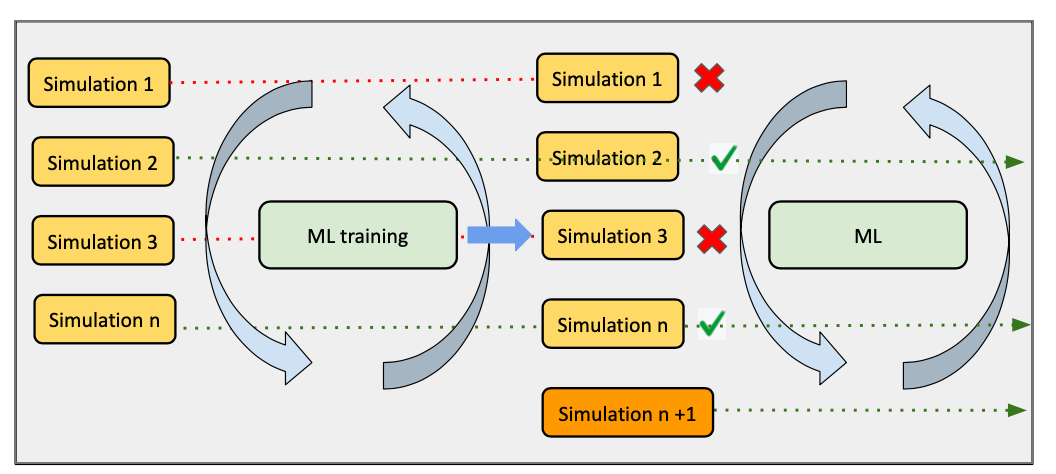
This example shows how DDS integrates with two other SINAPSE SDK components:
AsyncFlow —
WorkflowEnginewraps the backend and exposes@flow.executable_task, the decorator that turns an async Python function into a distributable HPC task.Rhapsody — supplies the execution backend:
ConcurrentExecutionBackendfor a laptop andDragonExecutionBackendfor Dragon-managed HPC nodes.
Prerequisites
Clone the repository and install it in development mode:
git clone https://github.com/radical-collaboration/DeepDriveSim.git
cd DeepDriveSim
pip install -e '.[dev]'
No GPU or HPC account is needed for the tutorial — the DummyWorkflow uses
lightweight shell scripts to simulate the full control loop.
How the control loop works
Every DDS workflow is a subclass of DDSimManager. The base class implements
start(), which drives the following loop until a subclass sets
run_workflow = False:
while run_workflow:
    # 1. Fill simulation slots up to sim_batch_size
    launch sims from sim_task_queue

    # 2. Wait for at least one sim to finish
    await asyncio.sleep(sleep_time)

    # 3. Train when enough data has accumulated
    if check_train_status() and retrain_model:
        if free_resources_for_train:
            pause running sims          # yield GPU/CPU slots
        train_model()

    # 4. Score running sims; cancel the low-utility ones
    if call_evaluate_simulations:
        evaluate_simulations()          # populates sim_predictions
        for sim_idx, score in sim_predictions.items():
            if stop_simulation(prediction=score):
                cancel sim
                add_sims_to_queue([sim_idx])   # re-queue for a fresh start

    # 5. Check stopping condition
    if call_finalize_results:
        finalize_results()              # sets run_workflow=False when done
The key insight is in step 4: a cancelled simulation immediately returns its resources to the pool, and a new simulation starts in its slot — all within the same asyncio event loop tick, without waiting for a scheduler allocation.
Key abstractions
Concept |
Class / attribute |
Role |
|---|---|---|
Control loop |
|
Drives the adaptive cycle |
Execution backend |
|
Runs tasks locally or on HPC |
Workflow engine |
|
Wraps the backend; exposes |
Pending simulations |
|
|
Running simulations |
|
|
Concurrency budget |
|
Max simultaneous tasks (sims + training) |
Prediction scores |
|
|
Methods a subclass must implement
Method |
Purpose |
|---|---|
|
Populate |
|
Return |
|
Run one training iteration (can pause sims first) |
|
Run inference; write results to |
|
Return |
|
Re-queue cancelled/paused sims |
|
Per-sim cleanup after completion |
|
Called every iteration; set |
|
Graceful shutdown |
Running the tutorial workflow
DummyWorkflow replaces real simulation and ML code with fast shell scripts so the
full loop runs on any machine:
from radical.asyncflow import WorkflowEngine
from rhapsody.backends import ConcurrentExecutionBackend
from workflows.dummy_workflow.dummy_workflow import DummyWorkflow

config = {
    "engine":                   "concurrent",
    "home_dir":                 "/tmp/ddsim_tutorial",
    "num_inputs":               6,    # total simulation inputs to process
    "max_sim_batch":            3,    # max concurrent simulations
    "training_cores":           1,    # cores reserved for the training task
    "start_training_threshold": 2,    # start training after 2 sims complete
    "training_threshold":       0.5,  # stop retraining once accuracy ≥ 0.5
    "prediction_threshold":     0.5,  # cancel sims with score < this
    "training_epochs":          1,
    "sleep_time":               1,    # seconds between main-loop polls
}

async def run():
    # 1. Create the backend — asyncio process pool, no HPC needed
    engine = await ConcurrentExecutionBackend()
    asyncflow = await WorkflowEngine.create(engine)

    workflow = DummyWorkflow(config=config, asyncflow=asyncflow)
    try:
        await workflow.start()   # drives the full simulate→train→evaluate loop
    finally:
        await workflow.close()
        await asyncflow.shutdown()

await run()
prediction_threshold is the key parameter: any running simulation whose
surrogate score falls below it is cancelled and its slot is immediately
reassigned to a new simulation from sim_task_queue.
Plugging in a real simulation code
Subclass DummyWorkflow (or DDSimManager directly) and override
register_tasks() to build the shell command for your executable.
AsyncFlow’s @flow.executable_task decorator turns the returned command string
into a task that the backend submits and tracks:
class MySimWorkflow(DummyWorkflow):

    def register_tasks(self):

        @self.flow.executable_task
        async def simulation(task_description=None, **kwargs):
            sim_idx = kwargs["sim_inputs"]["sim_idx"]
            return (
                f"python run_openmm.py "
                f"--input  {self.sim_inputs[sim_idx]} "
                f"--output {self.sim_output_dir}/{sim_idx}"
            )

        self.simulation = simulation
        # register train, predict the same way …
Override train_model() to call your ML training script, and
evaluate_simulations() to run inference and populate self.sim_predictions
with {sim_idx: score} pairs. The base class handles the rest of the loop.
Switching to HPC (Dragon backend)
On a Dragon-enabled HPC cluster, replace the backend — the workflow code is unchanged:
from rhapsody.backends import DragonExecutionBackend

engine = await DragonExecutionBackend()
asyncflow = await WorkflowEngine.create(engine)
workflow = MySimWorkflow(config=config, asyncflow=asyncflow)
await workflow.start()
Submit via Dragon instead of Python:
dragon run_workflow.py --config_file config.yaml
A ready-made SLURM script is provided at
workflows/dummy_workflow/delta_cpu_sbatch.sh for NCSA Delta.
DragonExecutionBackend supports await construction — await DragonExecutionBackend()
starts the Dragon runtime and returns a ready backend.
What the adaptive loop delivers
Without adaptation, every simulation runs to completion regardless of quality. With DDS, the surrogate model acts as an early-warning filter:
Aspect |
Without DDS |
With DDS |
|---|---|---|
Low-utility trajectories |
Run to completion |
Cancelled as soon as score drops below threshold |
GPU/CPU resources |
Held by unproductive runs |
Freed immediately and reassigned |
Configuration space coverage |
Uniform, blind |
Focused on high-information regions |
Surrogate quality |
Static (pre-trained or none) |
Improves every training round as more data arrives |
The loop continues until finalize_results() determines that all useful
simulation work is done — either a target number of completions, a model
accuracy threshold, or both.